Pages

Wednesday, January 4

A shortcut to make a PDF out of a webpage and save it to Notes.app

While on MacOS (and iOS) you can use the Share Sheet from Safari to share a webpage to Notes, it only shares the title, URL, and the favicon to save to a new Note.

I wanted a PDF of the entire page, so I wrote a shortcut to do it.


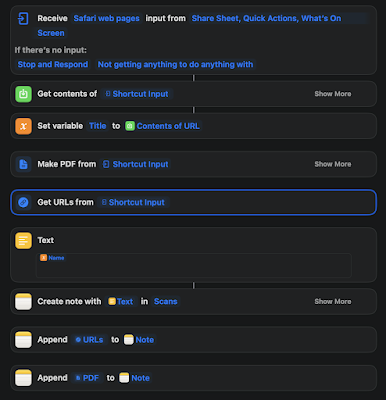
Here's a link to it, but also, here's a screenshot, since I know the shortcut links can be somewhat unreliable.


It grabs the input from the share sheet, gets the content of the page, and it saves the contents of the page as a variable called "Title".  Then it creates a PDF from the shortcut input.  It also grabs the URL from the shortcut input

Then I use the output of the variable "Title" in the Text block to grab the Name of the page:


Then it creates a Note with the title of the Note as the "Name" from the Title variable in a folder in my notes called "Scans", appends the URL from the "Get URLs" block and saves that in the Note, then appends the PDF to it.


Please leave comments below.

Thursday, April 8

Call of Duty Error 6034 for the Xbox

Several friends and I play Call of Duty nearly every night.  However, Activision’s most recent multiplayer update broke the heck out of Call Of Duty Modern Warfare’s Multiplayer mode. Luckily, my buddy Nigel figured out how to fix it, so here I am writing it down for you. 

Go to the Home menu, put your selector (cursor) on the game, hit start (not “A”). A menu will come up, on that menu it says “Manage Game and Add-Ons”. 

Select it, then go into the Addons section on the right.  You will need to remove some packages 

Look for Multiplayer Pack 2 (9.1 GB). Uncheck this one. 
Look for Multiplayer Pack 3 .  Uncheck this one. 

You need to have Multiplayer Pack 2 (22 GB) and Mutiplayer/Special Ops packs installed. 

Over on the night select save or whatever to save the state of the game. (To uninstall those two packages)

Now restart the game. You should be good. 

Wednesday, April 17

Evernote, Omnifocus, and my productivity

Over the past several years my job here at Cisco Talos has changed drastically.  I took on new roles, which is awesome and exciting, but in the process while trying to organize and create process and clarity for my team and those that work with my team, I lost my personal productivity.  Something I've written about extensively on this blog.

I shifted from Evernote (which I've been using forever, as readers of this blog will know) to Notes.app, and from Omnifocus (Also have been using it forever) to Reminders.app, all in an attempt to reduce the amount of 3rd party apps I had installed on my laptop, iPad, and iPhone and use a "native Apple experience".

I quickly outgrew them both.   I found out that Notes really tops out at around 2000 notes, then it becomes basically nonfunctional. My notes are not your typical Apple Notes.app "jot down a few things" type Notes though.  I've had a lot of people tell me that Notes handles their notes fine.  My notes have attachments, drawings, photos, complex formatting, etc.  I have thousands and thousands of notes.  I just don't think Notes.app could handle it.  Another feature I missed: Notes doesn't allow you to "Tag".  I can arrange my notes by topic, much like the "Notebook" feature in Evernote, but I can't "tag" something in Notes.app.

For example, how I use this in Evernote, and I'll touch on this later as well...  let's say I am going to a conference.  I get the agenda for the conference, my flights, my receipts, my notes, my meetings, everything that I am doing at the conference, I tag it something that represents the conference.  For example, my tag for "CiscoLive United States" is "clus".  I can find everything regardless of Notebook or arrangement with that tag.   I could compensate for this in Notes.app with something like #clusat the top of the note, and that worked for awhile, but as I said earlier, Notes.app's searching at thousands-of-notes scale is ridiculously slow, and let's not get started with the frustration of syncing across devices.

More on searching...  Notes can find text in a PDF or a Doc, that's fine, but it doesn't show you where in the PDF the text was.  Notes also doesn't do a good job of searching handwritten notes.  Something I do a lot of on my iPad. (I'll get to this later with my comments on Notability and Penultimate.)

As for Reminders.  It doesn't do any nesting of actions, vital to how I work in Omnifocus.  Plus I had a bunch of Applescripts that organized and automated things for my in Evernote and Omnifocus, and I had to rewrite some of them to deal with Reminders and Notes.  Things like being able to simply tap a keystroke, which prompts an entry box so I can create myself a reminder very quickly.  Omnifocus has this natively.  Reminders.app, I had to find one (or write one, I honestly don't remember which at this point)  btw --  here it is.

tell application "System Events"
display dialog"Create a new reminder" default answer"" cancel button"Cancel" giving up after 20 with icon path to resource "Reminders.icns" in bundle(path to application "Reminders")
set reminTitle to text returned of result
tell application "Reminders"
set newremin to make new reminder
set name of newremin to reminTitle
end tell
 end tell

If you use Reminders, and you want to steal that and make a keyboard shortcut that calls that AppleScript (if you use Reminders.app) feel free.

So, after using this new system for awhile, I found out it was a disaster, and in the past two weeks I have dedicated significant amounts of time to get back to my happy place where things were productive.

So, I'm back to using Evernote and Omnifocus again, and I am going write a few posts on how I've developed a system the works for me with these three tools.  Consider this.. part one.


Please leave comments below.
Wednesday, September 5

Is Evernote going away?

Evidently we don't know if Evernote is sticking around, since there seems to be some panic on the internet about it today.

https://appleinsider.com/articles/18/09/05/evernote-might-be-in-trouble-so-heres-how-to-get-your-notes-out-of-it-completely-and-safely

It is really easy to move your notes out of Evernote and into Notes.app on the Mac.  (Click the above link for the easy instructions.

However, if you use Hazel, to say, monitor the "Downloads" folder on your Mac, and if any files show up there (like a PDF for example) and you want to have it automatically saved to Notes.app.  (This is handy after you try it).

I wrote a little AppleScript to do this for you, (in Hazel) since I couldn't find one on the Internet, and it wasn't rocket science:

tell application "Notes"
set mynote to make new note at folder "PDFS"
make new attachment at mynote with data theFile
end tell

If you have a folder in Notes.app called "PDFS", it will create a new note in the folder for each file and attach the file to it (which for me, then syncs it with iCloud so the file is on all my devices). Pretty handy.

Anyway, putting this here in case any one else can use it.

Please leave comments below.

Monday, December 12

VimWiki, this looks pretty cool.

As it is very themed with some of my blog posts, I discovered this today, for all of you command line types:

VimWiki

Copy and pasted directly from their website, go check it out:

With Vimwiki you can

  • organize notes and ideas
  • manage todo-lists
  • write documentation
  • write a diary

Features

  • three markup syntaxes supported: Vimwiki's own syntax, Markdown, MediaWiki
  • export everything to HTML
  • link to other wiki pages and external files
  • search through all wiki pages
  • outline notes and tasks in indented lists
  • quickly manipulate numbered and bulleted lists
  • tag wiki pages or arbitrary places and quickly jump to tags
  • tables

Please leave comments below.

Wednesday, June 15

Why don't you write on your blog anymore?

1.  I don't feel like I have much to say.


I do a tremendous amount of writing and blogging on the Snort, ClamAV, and Talos blogs.  So, I get exhausted when I think about things I would want to write for this blog.

2.  When I do think about what I want to write about, I want to rant against companies and competitors.

But why would I want to give any competitors an intel on what they are doing wrong, or in some cases right?

3.  Twitter is 140 characters of BS, and I can't even think of 140 characters to spew on there half the time.

I know a bunch of people that just post random thoughts and spew for 100s of tweets a night about something, and they have thousands of followers.  I just don't feel like that's me, or it gets me anywhere.

4. Gov't or politics

I know a bunch about the subject, and I just don't feel like talking about it, since that's all the news is saying right now.  

Basically, no one cares!

And now I am tired.

Please leave comments below.

Thursday, March 10

You can't have it both ways

Too long for Twitter. 

Law enforcement agencies consistently praise Apple for introducing “activation lock,” which they claim has reduced violent robberies because criminals can’t steal iPhones and resell them.

However, these agencies now want Apple to allow law enforcement to bypass this feature, which is essentially the same.

While the lock screen passcode differs from the activation lock on an iPhone, the request is essentially the same: please allow us to guess or bypass the password.

I understand both sides of this issue, but I also believe that there are places, like the human brain, protected by the fifth amendment, where the government should not have access.

Tuesday, July 7

I just had the best travel experience ever

Left my office at 4:30 for a 5:15 flight.  I know what you are thinking, you are crazy...

You're right. Normally would never do this, but was running behind with stuff today.  Drove from my office in Columbia, MD to BWI. 

Parked the car, no problem. 

Walked to security (already checked in on my phone), went through TSA pre line, using the boarding pass on my watch.  No line. 

No one bothered me about my bag, no one told me to have my boarding pass and ID out and ready...

Went through security in about 30 seconds. 

Walked to gate, plane too small to bring on roller board bag, so, pink tag check it at gate.  Done. 

Boarded with watch, zone 1, only one in zone 1.

Went right to my seat, no waiting.

Hour flight, quick Coke on the flight, I wrote three emails, done. 

Got off flight had to wait 5 minutes for bag, darn. 

Walked out to car rental bus, had to wait another five minutes, darn. Bus driver was friendly, no waiting there, went to car rental facility, no traffic, got my space from the Hertz Gold board, walked to car, got in, tapped my phone to give me the address and directions to hotel, drove to hotel.

I was already checked in (via app) at hotel, no lines, picked up my key, walked to room. In room, was waiting a small snack.  


From when I left my office to my hotel room, less than three hours.  

Over the course of my career I have encountered everything that can possibly be wrong with a trip (except crashing in a plane, knock on wood).   Today, nothing went wrong.  

Today was a good day. 

Friday, March 13

Should we fire low-quality contributors to projects?

Friend of mine at work pointed this article out to me this morning:

Should we fire low-quality contributors to projects?

Good article that deals with the dilemma of dealing with toxic community members to a project.

Luckily in Snort and ClamAV, I've only had to deal with a handful of these.  Usually people that hide behind nicknames and like to try and shame people into submission to their ideas.  I've actually had people apologize to me years later for trolling or simply being toxic.

However, if you are a community manager for an open source project or a community project, this article gives you a couple things to think about.


Please leave comments below.

Monday, March 9

Threat Spotlight: Angler Lurking in the Domain Shadows

Nick Biasini on our Talos Outreach team wrote a piece of awesome over on our Talos Blog, I just wanted to highlight it.
Over the last several months Talos researchers have been monitoring a massive exploit kit campaign that is utilizing hijacked registrant accounts to create large amounts of subdomains for both initial redirection and exploitation. This campaign has been largely attributed to Angler Exploit Kit with fileless exploits serving various malicious payloads.
Check out the Angler Blog Post.

Please leave comments below.

Thursday, December 5

Because having small monitors is silly

My home desk with a 30in monitor, and a 24 in monitor. Anything smaller than 24 is just child's play.


Saturday, November 23

My iPhone did something useful today, and I didn't even ask it to

Happened to swipe down from the top this morning (Notifications screen) and I noticed that my iPhone told me that it would take about 34 minutes to get to Newark from where I was. 

Now, I've noticed this before, always when I was on the way to work or something where I had an appointment on my calendar with an address in it, my iPhone would estimate the time it would take for me to get there.  But today, I had nothing on my calendar, so how did it know where to estimate my time to?  So I thought about it. 

 Then I realized it was the "Frequent Locations" setting under privacy. I left this on when I upgraded to ios7, because I wanted to see, if anything, what useful functions came out of it. 

I went into there today and I noticed for the past several weekends my family went north to go to the mall, shopping, or something else near Newark, DE.  So the iPhone remembered that and said "okay, well, today is Saturday, so I am betting you are going to go to the mall today." And it gave me arrival time to that location. 

I think it's handy, borderline creepy, but helpful. 

So, I went to a different mall today, in a different direction. Just to screw with my phone. 

Saturday, October 19

Monday, September 10

Taliban pose as pretty women on Facebook, dupe soldiers | ZDNet

Taliban pose as pretty women on Facebook, dupe soldiers | ZDNet:

Speaking of Facebook, here is another cautionary tale about being careful who you talk to online.  Just because they say they are a woman, doesn't mean they are.


Please leave comments below.

How to secure your Facebook account

How to secure your Facebook account | ITProPortal.com

Some good tips here, just how to make sure the following settings are setup the best you can for privacy. Not really a lot of content, but good to forward to that person in your life that needs a bit of help.


Privacy settings
Ads, apps, and websites

Saturday, July 28

Mountain Lion: How to get the most out of iMessage

So, now that Mountain Lion has been released for everyone I thought I'd write a quick blog post on how to get the most out of iMessages (now called Messages) on your iOS device and your Desktop.

If you are an Apple Ecosystem person (iOS + OSX) you'll love it.  Messages is the replacement for iChat and it allows you to have the same conversation with anyone that is in the iOS ecosystem across all your devices all at the same time.

So here's how to get the most out of it.

Open Messages, the icon looks like the above picture.  In your preferences, you need to set up your iMessages account.  I use my iCloud account, (me.com), but you can use any email address I believe.  So, add your iMessages account.  Enter all your email addresses there on the bottom, it may ask you to verify them (at which point Apple will send you an email through the account that you entered to ensure you actually own that account):


The next setting to pay attention to is the "Caller ID".  Pay particular attention here because you are going to want to set that to be the same as your iOS device.  This is the awesome part where everything becomes one.

Then you should be good to go on the desktop.

Now let's setup iOS to be exactly the same.  So go into your Settings in iOS, and go to Messages.  It should look something like this:


Tap on that with your finger.  Take a look at the settings and set those up how you want them.
But you'll see a section that says something to the effect of "Send & Receive":


Note: I am using the developers preview of iOS 6 to take these screenshots, so your screen will look different.

Go in there and add all the same email addresses that you added on your Desktop.  Also, on the bottom, you will see "Caller ID".  Set the Caller ID to be the same as what you put on your Desktop.  On your iOS devices, I'd suggest NOT setting it as your phone number.  I set mine as my iCloud email address, as that address has my phone name right in it and it's pretty obvious to the recipient who is sending a message.

Repeat this process if you have multiple OSX Desktop machines (laptops), iPads, iPhones, whatever.

After this process is complete, whenever you have a conversation through iMessage, it'll be the same on all your devices.  Desktop, iPad, iPhone whatever.  When people answer you back, it'll go to all your devices.

This allows you to start a conversation on your Desktop, pick up your iPad, go to a meeting, have the same conversation going on seamlessly, no syncing with anything, and keep going in the same conversation.  Have to leave the meeting to go somewhere?  Pick up your iPhone, because the conversation will be exactly the same.

If everyone in the ecosystem did this, it would be a seamless network of interaction between everyone.  I love it.  I hope that Apple will streamline this setup process a little bit, (like unifying the phone number and email address, and allowing the setup of the accounts in one place, and those settings pushed through iCloud to all devices, so that everything is the same)

One more thing.

Open up Facetime.  Open up your preferences in Facetime, and set everything up the same way.  That way, your Facetime is also ubiquitous everywhere.  


Please leave comments below.

Sunday, July 1

@Sparrow, I have a feature request

In the Gmail interface, if you are in the middle of a "conversation" there is a black arrow to the message you are currently working with.  That way you can put the arrow on a specific email and then hit enter to expand that message.  The current Sparrow interface doesn't have the black arrow to see where you are in the conversation.

That being said, if you are in the middle of a thread (where there are new messages appended to an already thick stack of messages in a conversation that is collapsed when you reopen it), the black arrow should be by default placed on the new (non collapsed message), as Gmail does.

This is all for consistency in between the two platforms, and the need for the keyboard shortcuts (the best feature of Sparrow IMO) to function exactly the same as Gmail's.


Please leave comments below.

Wednesday, May 9

Apple Hardens Security with Mac OS X 10.7.4 and Safari 5.1.7

TidBITS Safe Computing: Apple Hardens Security with Mac OS X 10.7.4 and Safari 5.1.7:

What a fantastic idea.

From the article:


Safari will now check the version of Flash you are running and disable it if it is not capable of updating itself to a current version. Flash versions 10.1.102.64 (yes, that’s a version number, not an IP address) and older don’t include the capability to update themselves to new releases, requiring users to update manually. Newer versions will self-update as Adobe releases fixes, which minimizes the chances a user will be exposed to Flash-related security issues.

It also fixes this error:

Mac OS X 10.7.4 fixes a security error introduced in 10.7.3 that exposed a user’s password if they upgraded to Lion while leaving the legacy version of FileVault enabled. The flaw was due to a developer leaving debugging code enabled, which logged the user’s password in plain text. This problem affected only the older version of FileVault that encrypted a user’s home directory, as opposed to the FileVault 2 feature enabled in Lion that encrypts the entire disk. To be exposed, you would have had to upgrade a legacy FileVault system to Lion and keep the older FileVault in place.
Although this extremely serious bug essentially negated any password security on affected systems, relatively few users were likely exposed.