Pages

Showing posts with label shortcuts. Show all posts

Monday, December 9

Auto Creating Reminders from Email Messages

In my constant state of trying to make things a bit more efficient for myself. (I'm a big believer in automation, ask anyone that has ever worked with me.) We have computers! Make the computers do work instead of us manually doing things on the computer.  

I wanted to find a way to auto-create a reminder from an email. I assume you can figure out how to create a rule to match an email in Mail.app, but one of the actions you can take on a mail rule is "Run AppleScript".

This AppleScript, given the email match, will create a reminder that links back to the email for you:

using terms from application "Mail"

    on perform mail action with messages selectedMessages

        try

            log "Starting script execution"

            tell application "Reminders"

                repeat with theMessage in selectedMessages

                    try

                        tell application "Mail"

                            -- Fetch subject and message ID

                            set emailSubject to subject of theMessage

                            set messageID to message id of theMessage


                            -- Mark email as read

                            set read status of theMessage to true


                            -- Change email color to blue

                            set background color of theMessage to blue

                        end tell


                        -- Log values for debugging

                        log "Email Subject: " & emailSubject

                        log "Message ID: " & messageID


                        -- Construct reminder properties

                        set reminderText to emailSubject

                        set emailLink to "message://%3C" & messageID & "%3E"

                        set reminderNotes to "Link to the email: " & emailLink


                        -- Create reminder in default list

                        tell list "Reminders" -- Change "Reminders" to your desired list name

                            make new reminder with properties {name:reminderText, body:reminderNotes}

                        end tell


                    on error errMsg

                        log "Error processing message: " & errMsg

                    end try

                end repeat

            end tell

        on error errMsg

            log "Script execution error: " & errMsg

        end try

        log "Script finished execution"

    end perform mail action with messages

end using terms from


You need to change the "list" (see "tell list") you want the reminder to go into.

This will take an email, mark it as read, change the background color of the email to blue, create the reminder, and then exit.

You can't put the "message://" link in the URL field directly with AppleScript, as there is no method within the AppleScript reminders dictionary to access "URL". Shortcuts.app can, but AppleScript can't. (I know, right?)

But I have a Shortcut that I execute from the end of this AppleScript that moves it for me. You can execute the shortcut from the AppleScript by putting this after the last "end tell”.

            do shell script "shortcuts run \"URL Mover for Reminders message\""

            log "Shortcut executed successfully"


There's the shortcut. It'll handle both "message://" and "<message:" links (the latter created by OmniFocus if you moved from OmniFocus to Reminders).


Please leave comments below.

Thursday, December 7

Grabbing a domain name out of a URL using Shortcuts

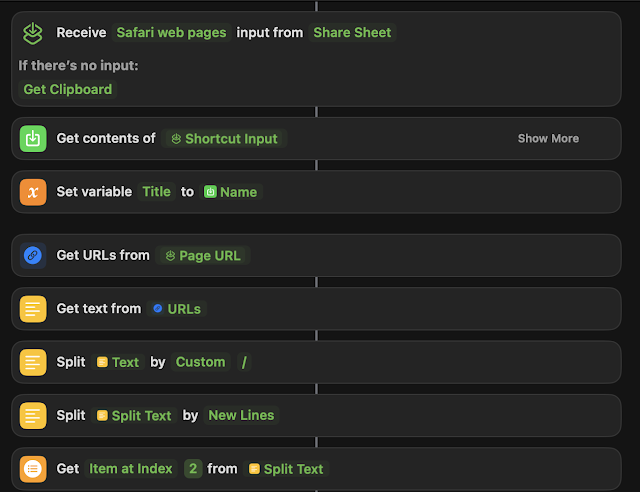
Recently I needed the ability to grab a domain name (specifically the hostname) out of a URL using Shortcuts.  

I wanted to integrate this functionality into a much larger shortcut, but this blog post will highlight just the domain parsing bit.


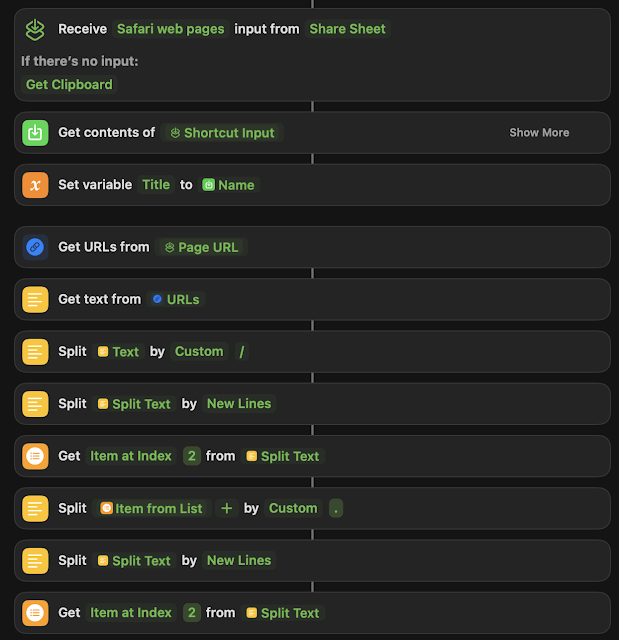
This will get you the whole domain name from any given URL from the share sheet.  That being said, I wanted to take it a step further and get just the hostname out of the domain name:


Assuming that there is more than two parts to the domain name, this works.  But if you have and "A" type of url "blah.com" instead of a "CNAME" type like: "www.blah.com", you're going to get "com" as a result.  So your milage may vary.

I couldn't find a good way to do this on the Internet, despite several attempts for people to try and figure it out using regex.  You can then go on to store the result as a variable and then use the variable anywhere else in the rest of the Shortcut.  

Anyway, here's a way to do it.  Hopefully this blog post helps someone trying to figure out the same issue.  It's a little hacky, but knock yourself out.


Please leave comments below.

Wednesday, January 4

A shortcut to make a PDF out of a webpage and save it to Notes.app

While on MacOS (and iOS) you can use the Share Sheet from Safari to share a webpage to Notes, it only shares the title, URL, and the favicon to save to a new Note.

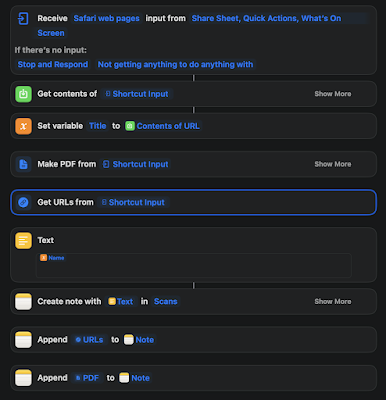
I wanted a PDF of the entire page, so I wrote a shortcut to do it.


Here's a link to it, but also, here's a screenshot, since I know the shortcut links can be somewhat unreliable.


It grabs the input from the share sheet, gets the content of the page, and it saves the contents of the page as a variable called "Title".  Then it creates a PDF from the shortcut input.  It also grabs the URL from the shortcut input

Then I use the output of the variable "Title" in the Text block to grab the Name of the page:


Then it creates a Note with the title of the Note as the "Name" from the Title variable in a folder in my notes called "Scans", appends the URL from the "Get URLs" block and saves that in the Note, then appends the PDF to it.


Please leave comments below.