I have some thoughts on Apple Intelligence’s delay, and why I think people are missing the point entirely.
Showing posts with label apple. Show all posts
Showing posts with label apple. Show all posts
Wednesday, March 19


Monday, January 27
My Morning Workflow with my iPad, Apple Notes, Reminders, and Shortcuts
Experimenting with posting over on Medium. Seems to be easier, and has some very interesting features.
Anyway, my first post is up over there:
Since I have lots of readers here, I figured they might be interested.
Please leave comments below.
Please leave comments below.
Monday, December 9
Auto Creating Reminders from Email Messages
In my constant state of trying to make things a bit more efficient for myself. (I'm a big believer in automation, ask anyone that has ever worked with me.) We have computers! Make the computers do work instead of us manually doing things on the computer.
I wanted to find a way to auto-create a reminder from an email. I assume you can figure out how to create a rule to match an email in Mail.app, but one of the actions you can take on a mail rule is "Run AppleScript".
This AppleScript, given the email match, will create a reminder that links back to the email for you:

Please leave comments below.
using terms from application "Mail"
on perform mail action with messages selectedMessages
try
log "Starting script execution"
tell application "Reminders"
repeat with theMessage in selectedMessages
try
tell application "Mail"
-- Fetch subject and message ID
set emailSubject to subject of theMessage
set messageID to message id of theMessage
-- Mark email as read
set read status of theMessage to true
-- Change email color to blue
set background color of theMessage to blue
end tell
-- Log values for debugging
log "Email Subject: " & emailSubject
log "Message ID: " & messageID
-- Construct reminder properties
set reminderText to emailSubject
set emailLink to "message://%3C" & messageID & "%3E"
set reminderNotes to "Link to the email: " & emailLink
-- Create reminder in default list
tell list "Reminders" -- Change "Reminders" to your desired list name
make new reminder with properties {name:reminderText, body:reminderNotes}
end tell
on error errMsg
log "Error processing message: " & errMsg
end try
end repeat
end tell
on error errMsg
log "Script execution error: " & errMsg
end try
log "Script finished execution"
end perform mail action with messages
end using terms from
You need to change the "list" (see "tell list") you want the reminder to go into.
This will take an email, mark it as read, change the background color of the email to blue, create the reminder, and then exit.
You can't put the "message://" link in the URL field directly with AppleScript, as there is no method within the AppleScript reminders dictionary to access "URL". Shortcuts.app can, but AppleScript can't. (I know, right?)
But I have a Shortcut that I execute from the end of this AppleScript that moves it for me. You can execute the shortcut from the AppleScript by putting this after the last "end tell”.
do shell script "shortcuts run \"URL Mover for Reminders message\""
log "Shortcut executed successfully"
There's the shortcut. It'll handle both "message://" and "<message:" links (the latter created by OmniFocus if you moved from OmniFocus to Reminders).
Please leave comments below.
Wednesday, July 10
Apple's AI Challenges in the EU: A Casual Take
So, Apple has stated that it is uncertain if it is bringing some of its AI features to the EU -- there’s a lot to unpack here. They say they're unsure if their AI can meet the EU's strict regulations. Considering how tightly Apple's ecosystem is knit together, it's a valid concern.
Apple has had to make some significant changes to comply with EU rules—allowing other browsers, mail clients, and even alternative app stores on their devices. But it's interesting that the EU hasn't touched Apple's Weather app or other basic utilities. This shows the focus is more on certain competition and user choice where other companies have complained (Spotify, Epic Games). (Engadget) (MacRumors).
During WWDC, Apple said they want to let other AI and machine learning models onto their devices. There are several presentations about this subject that happened during WWDC, and you can watch the videos on line. They even rolled out a dev kit for it. This means not just Apple's AI but also others can run on iPhones and iPads. Still, whether this will satisfy EU regulations is a big question mark. The EU's rules are pretty strict, especially regarding privacy and security, and Apple's AI is deeply woven into their hardware and cloud services (Engadget).
Some EU regulators have accused Apple of "malicious compliance," suggesting they're not allowing AI in the EU to dodge competition rules. I think the real issue is that Apple’s AI is so intertwined with their hardware that meeting the EU's requirements is a tough nut to crack (MacRumors).
Apple's ongoing struggle with EU regulations highlights the tension between their integrated tech approach and the need for more openness and competition in the market. The future of AI on Apple devices in the EU is still up in the air (Gadgets 360).
Bottom line -- I don't think Apple is saying "we may not roll out AI in the EU" to be mean, I think they are saying it from a legitimate point of view. Apple doesn't know if they are going to be allowed to.
Please leave comments below.
Thursday, December 7
Grabbing a domain name out of a URL using Shortcuts
Recently I needed the ability to grab a domain name (specifically the hostname) out of a URL using Shortcuts.
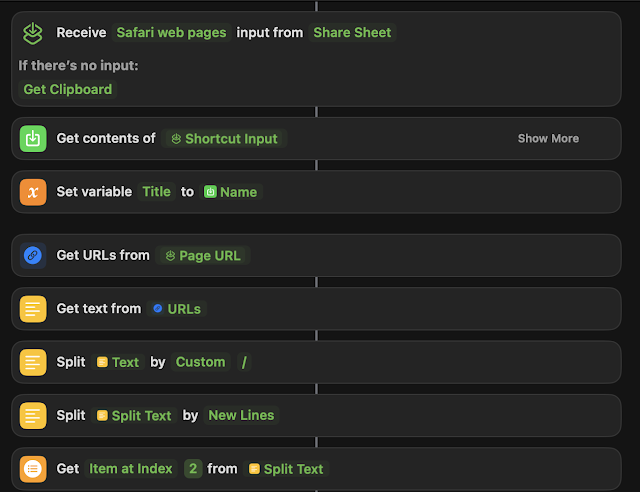
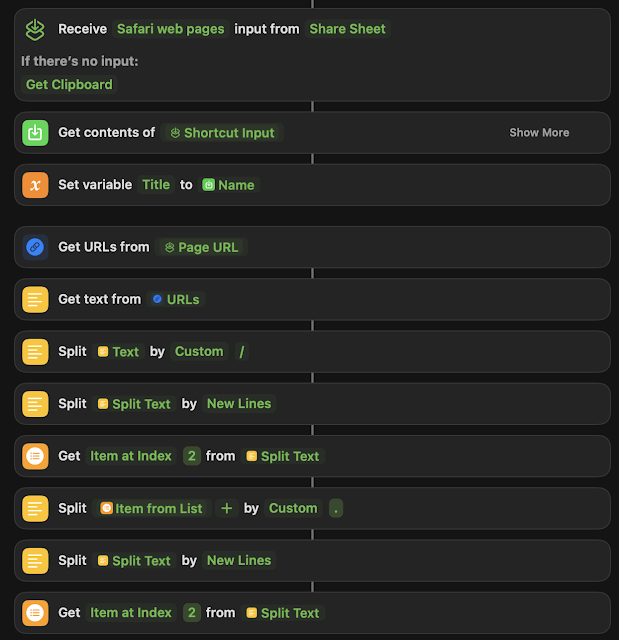
Assuming that there is more than two parts to the domain name, this works. But if you have and "A" type of url "blah.com" instead of a "CNAME" type like: "www.blah.com", you're going to get "com" as a result. So your milage may vary.
I couldn't find a good way to do this on the Internet, despite several attempts for people to try and figure it out using regex. You can then go on to store the result as a variable and then use the variable anywhere else in the rest of the Shortcut.
I wanted to integrate this functionality into a much larger shortcut, but this blog post will highlight just the domain parsing bit.
This will get you the whole domain name from any given URL from the share sheet. That being said, I wanted to take it a step further and get just the hostname out of the domain name:
Assuming that there is more than two parts to the domain name, this works. But if you have and "A" type of url "blah.com" instead of a "CNAME" type like: "www.blah.com", you're going to get "com" as a result. So your milage may vary.
Anyway, here's a way to do it. Hopefully this blog post helps someone trying to figure out the same issue. It's a little hacky, but knock yourself out.
Please leave comments below.
Please leave comments below.
Sort emails by year, using AppleScript
So, way back when I was using Thunderbird, I had this awesome plugin that organized my archived emails by year. It was super handy for finding stuff or just taking a trip down memory lane.
But when I switched to Mail.app, I couldn't find a similar plugin that I liked. Plus, even if one existed, I'd have to install it on every new Mac I got. So, I decided to take matters into my own hands and whip up some AppleScript magic.
In the code, you can pick a folder (sourceFolder) - in my case, it's "Recovered". You also need to specify your account name, like "iCloud" in my code. If your account goes by a different name, like "Exchange" or "Gmail", just tweak that part.
Then there's this variable called "yearsMailbox" at the top of the code, (in my case "Years") which is basically the folder where the emails will end up based on their years. You can rename it if you're feeling fancy.
You can probably make this more efficient by having it map the year folders one time instead of checking every time it wants to move a message, but I feel you're just playing "AppleScript golf" at that point. This works. It works great. Moving on.
tell application "Mail"
-- Specify the parent mailbox where the year folders are located
set yearsMailbox to mailbox "Years" of account "iCloud" -- Adjust if the path is different
-- List of sub-mailboxes under 'Years', each named with a four-digit year
set yearFolders to every mailbox of yearsMailbox
-- Specify the source folder where emails are currently located
set sourceFolder to mailbox "Recovered" -- Replace "SourceFolder" with the name of your folder
repeat with eachMessage in (get messages of sourceFolder)
set messageDate to date received of eachMessage
set messageYear to year of messageDate as string
-- Check if a folder for the year exists and move the message
repeat with eachYearFolder in yearFolders
if name of eachYearFolder is messageYear then
move eachMessage to eachYearFolder
exit repeat
end if
end repeat
end repeat
end tell
Please leave comments below.
Wednesday, January 4
A shortcut to make a PDF out of a webpage and save it to Notes.app
While on MacOS (and iOS) you can use the Share Sheet from Safari to share a webpage to Notes, it only shares the title, URL, and the favicon to save to a new Note.
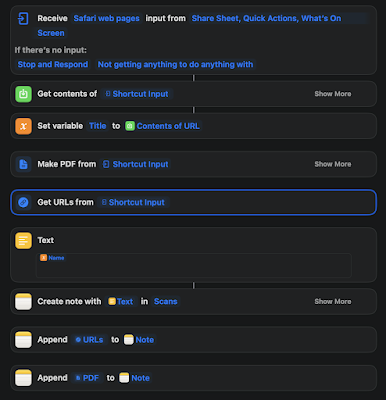
It grabs the input from the share sheet, gets the content of the page, and it saves the contents of the page as a variable called "Title". Then it creates a PDF from the shortcut input. It also grabs the URL from the shortcut input

Please leave comments below.
I wanted a PDF of the entire page, so I wrote a shortcut to do it.
Here's a link to it, but also, here's a screenshot, since I know the shortcut links can be somewhat unreliable.
Then I use the output of the variable "Title" in the Text block to grab the Name of the page:
Then it creates a Note with the title of the Note as the "Name" from the Title variable in a folder in my notes called "Scans", appends the URL from the "Get URLs" block and saves that in the Note, then appends the PDF to it.
Please leave comments below.
Saturday, September 20

Thursday, December 5
Because having small monitors is silly
My home desk with a 30in monitor, and a 24 in monitor. Anything smaller than 24 is just child's play.

Saturday, November 23
My iPhone did something useful today, and I didn't even ask it to
Happened to swipe down from the top this morning (Notifications screen) and I noticed that my iPhone told me that it would take about 34 minutes to get to Newark from where I was.
 Then I realized it was the "Frequent Locations" setting under privacy. I left this on when I upgraded to ios7, because I wanted to see, if anything, what useful functions came out of it.
Now, I've noticed this before, always when I was on the way to work or something where I had an appointment on my calendar with an address in it, my iPhone would estimate the time it would take for me to get there. But today, I had nothing on my calendar, so how did it know where to estimate my time to? So I thought about it.
I went into there today and I noticed for the past several weekends my family went north to go to the mall, shopping, or something else near Newark, DE. So the iPhone remembered that and said "okay, well, today is Saturday, so I am betting you are going to go to the mall today." And it gave me arrival time to that location.
I think it's handy, borderline creepy, but helpful.
So, I went to a different mall today, in a different direction. Just to screw with my phone.
Saturday, July 28
Mountain Lion: How to get the most out of iMessage
So, now that Mountain Lion has been released for everyone I thought I'd write a quick blog post on how to get the most out of iMessages (now called Messages) on your iOS device and your Desktop.
If you are an Apple Ecosystem person (iOS + OSX) you'll love it. Messages is the replacement for iChat and it allows you to have the same conversation with anyone that is in the iOS ecosystem across all your devices all at the same time.
So here's how to get the most out of it.


Please leave comments below.
If you are an Apple Ecosystem person (iOS + OSX) you'll love it. Messages is the replacement for iChat and it allows you to have the same conversation with anyone that is in the iOS ecosystem across all your devices all at the same time.
So here's how to get the most out of it.
Open Messages, the icon looks like the above picture. In your preferences, you need to set up your iMessages account. I use my iCloud account, (me.com), but you can use any email address I believe. So, add your iMessages account. Enter all your email addresses there on the bottom, it may ask you to verify them (at which point Apple will send you an email through the account that you entered to ensure you actually own that account):

The next setting to pay attention to is the "Caller ID". Pay particular attention here because you are going to want to set that to be the same as your iOS device. This is the awesome part where everything becomes one.
Then you should be good to go on the desktop.
Now let's setup iOS to be exactly the same. So go into your Settings in iOS, and go to Messages. It should look something like this:

Tap on that with your finger. Take a look at the settings and set those up how you want them.
But you'll see a section that says something to the effect of "Send & Receive":

Note: I am using the developers preview of iOS 6 to take these screenshots, so your screen will look different.
Go in there and add all the same email addresses that you added on your Desktop. Also, on the bottom, you will see "Caller ID". Set the Caller ID to be the same as what you put on your Desktop. On your iOS devices, I'd suggest NOT setting it as your phone number. I set mine as my iCloud email address, as that address has my phone name right in it and it's pretty obvious to the recipient who is sending a message.
Repeat this process if you have multiple OSX Desktop machines (laptops), iPads, iPhones, whatever.
After this process is complete, whenever you have a conversation through iMessage, it'll be the same on all your devices. Desktop, iPad, iPhone whatever. When people answer you back, it'll go to all your devices.
This allows you to start a conversation on your Desktop, pick up your iPad, go to a meeting, have the same conversation going on seamlessly, no syncing with anything, and keep going in the same conversation. Have to leave the meeting to go somewhere? Pick up your iPhone, because the conversation will be exactly the same.
If everyone in the ecosystem did this, it would be a seamless network of interaction between everyone. I love it. I hope that Apple will streamline this setup process a little bit, (like unifying the phone number and email address, and allowing the setup of the accounts in one place, and those settings pushed through iCloud to all devices, so that everything is the same)
One more thing.
Open up Facetime. Open up your preferences in Facetime, and set everything up the same way. That way, your Facetime is also ubiquitous everywhere.

Please leave comments below.
Friday, November 4
Yield Thought, this guy swapped his MacBook for an iPad+Linode
Yield Thought, I swapped my MacBook for an iPad+Linode:
(whoops)
This guy is nuts. I could never do this. Even though 99% of my work is done via screen @ work as well.
Interesting though.
(whoops)
Wednesday, October 19
MacOSX Flashback Trojan is covered by ClamAV
So called because it looks like an Adobe Flash Installer. There seems to be a ton of news around this Trojan on various Mac-related websites. http://www.tuaw.com/2011/10/19/trojan-variation-disables-mac-malware-protection/ for instance.
We wrote protection for this in ClamAV about 5 days ago. I know a lot of Mac users run ClamAV, so I just thought I'd throw this out there.
Please leave comments below.
We wrote protection for this in ClamAV about 5 days ago. I know a lot of Mac users run ClamAV, so I just thought I'd throw this out there.
Please leave comments below.
Wednesday, August 17
Android isn't free, unless you are the end user.
Android isn't free.
Apparently Google has found that out that a free OS isn't free. It's going to cost you legal fees. Being sued by everyone under the sun, Google has found itself in a sticky predicament, and has to defend itself with patents. However, Apple still holds the patent on multitouch, so we'll have to see how that all works out.
So they bought Motorola Mobility. yes. That division of Motorola that almost shut down and is nearly bankrupt -- and they paid 12.5B for it. Srsly.
Even Balmer says Android isn't free. Awhile ago. http://tech.fortune.cnn.com/2010/05/21/steve-ballmers-claim-android-isnt-really-free/
Unless you are the end user, when you can download and compile Android "for free" for use on your phone.
Should be interesting.
Please leave comments below.
Apparently Google has found that out that a free OS isn't free. It's going to cost you legal fees. Being sued by everyone under the sun, Google has found itself in a sticky predicament, and has to defend itself with patents. However, Apple still holds the patent on multitouch, so we'll have to see how that all works out.
So they bought Motorola Mobility. yes. That division of Motorola that almost shut down and is nearly bankrupt -- and they paid 12.5B for it. Srsly.
Even Balmer says Android isn't free. Awhile ago. http://tech.fortune.cnn.com/2010/05/21/steve-ballmers-claim-android-isnt-really-free/
Unless you are the end user, when you can download and compile Android "for free" for use on your phone.
Should be interesting.
Please leave comments below.
Tuesday, May 31
Apple's "known bad" Xprotect file is now automatically updated
Very technical term I used there in the subject.. I know.
Apple just released Security Update 2011-003, in which they check for the MacDefender Malware, which I wrote about here. But the most interesting part of the update is this paragraph:
If you don't know what I am talking about when I say "anti-malware file" I suggest you read this post as well.
Please leave comments below.
Apple just released Security Update 2011-003, in which they check for the MacDefender Malware, which I wrote about here. But the most interesting part of the update is this paragraph:
File QuarantineWhere apparently, Apple has built in an automatic updater to their anti-malware file, in it's most basic form, giving Apple the ability to directly protect their OS against the newest Malware.
Available for: Mac OS X v10.6.7, Mac OS X Server v10.6.7
Impact: Automatically update the known malware definitions
Description: The system will check daily for updates to the File
Quarantine malware definition list. An opt-out capability is provided
via the "Automatically update safe downloads list" checkbox in Security Preferences. Additional information is available in this.
Knowledge Base article: http://support.apple.com/kb/HT4651
If you don't know what I am talking about when I say "anti-malware file" I suggest you read this post as well.
Please leave comments below.
Sunday, May 15
Locking your screen on OSX
Friend of mine tipped me to this (thanks @englishlfc). People have asked me in the past about this, basically, how to lock your screen (Start your screen saver) using a keyboard shortcut on OSX.
On Windows you can mash Windows-L and it will lock your screen. Or Ctrl-alt-del, enter. (God it pains me to watch people hit Ctrl-Alt-Del and then MOUSE to "Lock Screen"... GRR!!)
My solution in OSX has always been to set my bottom left corner of my screen to "activate screen saver". Then I could just move my mouse to that corner, and viola, locked screen.
But @englishlfc was looking to the same thing with the keyboard, and there are a ton of ways of doing it in Applescript, but it's even easier with Automator.
So, go open Automator, and select new "Workflow".
You'll get a blank screen that looks like this:


Please leave comments below.
On Windows you can mash Windows-L and it will lock your screen. Or Ctrl-alt-del, enter. (God it pains me to watch people hit Ctrl-Alt-Del and then MOUSE to "Lock Screen"... GRR!!)
My solution in OSX has always been to set my bottom left corner of my screen to "activate screen saver". Then I could just move my mouse to that corner, and viola, locked screen.
But @englishlfc was looking to the same thing with the keyboard, and there are a ton of ways of doing it in Applescript, but it's even easier with Automator.
So, go open Automator, and select new "Workflow".
You'll get a blank screen that looks like this:

Select "Utilities on the left, and then find "Start Screen Saver" in the next column:

Drag "Start Screen Saver" over to the right:

That's it. Save it as an "Application" in Documents or Applications.
Then go to System Preferences and set up a Keyboard Shortcut to activate that App:

Simple.
I did it a bit differently. I used Alfred's new "Global Keyboard Shortcut" functionality to activate the app.

Done.
Maybe this'll help someone.
Want to know how to do this in Applescript?

Please leave comments below.
Sunday, February 27
Mac OS X Lion iChat supports Yahoo Messenger video and voice chat
As the title of the article title states, Apple's OSX iChat client on OSX 7 Lion supports Yahoo Instant Messenger adding to support for AIM, GChat, and standard Jabber.
This is a welcome addition and stands to keep chipping away at the other major Instant Messenger clients, but, why is there two separate video chat clients for the Mac? (Facetime, iChat)
It would seem to me that it would make more sense to combine these two.
Anyway, I hope they fix this before OSX 7 is released finally. I'd love to have one app that covered both IM and Mobile Video Chat.
Appleinsider has a great breakdown featuring some nice videos of OSX7 on their site here and here. Check it out if you are an Apple user like me.
Other notable features of OSX7 I think:
This is a welcome addition and stands to keep chipping away at the other major Instant Messenger clients, but, why is there two separate video chat clients for the Mac? (Facetime, iChat)
It would seem to me that it would make more sense to combine these two.
- Facetime traverses NAT (etc) better than iChat
- Facetime uses less bandwith
- Facetime is now "HD" (as Apple calls it), leaving the "quality" issue behind (iChat's resolution was better than Facetime, as Facetime is faster on the network)
- However, iChat does support up to 3 video calls at once (and like, 10 audio)
Anyway, I hope they fix this before OSX 7 is released finally. I'd love to have one app that covered both IM and Mobile Video Chat.
Appleinsider has a great breakdown featuring some nice videos of OSX7 on their site here and here. Check it out if you are an Apple user like me.
Other notable features of OSX7 I think:
- No Front Row
- Java runtime is not installed by default, it's a download now.
- Rosetta support (so support for running PowerPC apps on Intel machines) is gone. Meaning that Apps should be smaller in size.
- Migration Assistant now supports helping Windows users move over to the Mac (smart)
- OSX Lion was given to a few researchers for review, so they can beat it up. Very nice work. I hope Apple rewards the researchers in some way.
Wednesday, January 12
H.264 is being dropped from Chrome
Chromium Blog: HTML Video Codec Support in Chrome.
Key sentence from above article:
"Though H.264 plays an important role in video, as our goal is to enable open innovation, support for the codec will be removed and our resources directed towards completely open codec technologies."
Key comment from Slashdot on above article:
"This serves two strategic purposes for Google. First, it advances a codec that’s de facto controlled by Google at the expense of a codec that is a legitimate open standard controlled by a multi-vendor governance process managed by reputable international standards bodies. (“Open source” != “open standard”.) And second, it will slow the transition to HTML5 and away from Flash by creating more confusion about which codec to use for HTML5 video, which benefits Google by hurting Apple (since Apple doesn’t want to support Flash), but also sucks for users."
Google, just when I started to like you again. I turned away from you for about a year and a half because you pissed me off with the Buzz thing. Now you go and do this.
Key sentence from above article:
"Though H.264 plays an important role in video, as our goal is to enable open innovation, support for the codec will be removed and our resources directed towards completely open codec technologies."
Key comment from Slashdot on above article:
"This serves two strategic purposes for Google. First, it advances a codec that’s de facto controlled by Google at the expense of a codec that is a legitimate open standard controlled by a multi-vendor governance process managed by reputable international standards bodies. (“Open source” != “open standard”.) And second, it will slow the transition to HTML5 and away from Flash by creating more confusion about which codec to use for HTML5 video, which benefits Google by hurting Apple (since Apple doesn’t want to support Flash), but also sucks for users."
Google, just when I started to like you again. I turned away from you for about a year and a half because you pissed me off with the Buzz thing. Now you go and do this.
One step forward, two steps back.
Tuesday, January 11
iPhone 4 goes to Verizon too.
Finally, after long last, the iPhone is coming to Verizon.
I probably could go on Ad nausem about the new iPhone, but I'll just cover the bullet points
This will be nice.
I probably could go on Ad nausem about the new iPhone, but I'll just cover the bullet points
- The antenna is redesigned, and as a result the buttons are moved slightly down on the left, so some cases may not fit.
- CDMA, not LTE. Which means you can't talk and surf at the same time. (Feature that I use a lot)
- You can use the iPhone as a wifi hotspot (so like a mifi) for up to 5 devices. Nice.
- Coming February 10th for GA. Advanced ordering for Verizon Customers on Feb 3.
- Otherwise, it's the iPhone 4.
This will be nice.
Tuesday, December 21
Macworlds 2010 App Gems Awards
Macworlds 2010 App Gems Awards | Mobile | Macworld.
p.p1 {margin: 0.0px 0.0px 12.0px 0.0px; font: 12.0px 'Lucida Grande'}
p.p1 {margin: 0.0px 0.0px 12.0px 0.0px; font: 12.0px 'Lucida Grande'}
Macworld’s list of the best iOS apps from 2010. Some really nice stuff here, good to see that I have most of them and use them quite often.
If you are an iOS user, check it out.
Subscribe to:
Posts (Atom)
-
 Without going off the deep-end here and discussing every single Snort rule keyword, I just wanted to touch on a few modifiers that people so...
 -
Let me start off by saying I'm not bashing the writer of this article, and I'm trying not to be super critical. I don't want to...
-
Recently I needed the ability to grab a domain name (specifically the hostname) out of a URL using Shortcuts. I wanted to integrate this f...
