I have some thoughts on Apple Intelligence’s delay, and why I think people are missing the point entirely.
Wednesday, March 19


Thursday, January 30
Why I ditched Omnifocus for Reminders
Why I ditched Omnifocus for Reminders....
I've talked about both many times on this blog, but I've made the switch, wrote it down:
https://medium.com/@zkmtxvfh/why-i-ditched-omnifocus-for-reminders-34bd9e0feaf0
Please leave comments below.
Please leave comments below.
Tuesday, January 28
What I really want out of Apple Intelligence
A blog post I wrote over on Medium:
https://medium.com/@zkmtxvfh/what-i-really-want-out-of-apple-intelligence-81ea134b43c5
Please leave comments below.
Please leave comments below.
Monday, January 27
My Morning Workflow with my iPad, Apple Notes, Reminders, and Shortcuts
Experimenting with posting over on Medium. Seems to be easier, and has some very interesting features.
Anyway, my first post is up over there:
Since I have lots of readers here, I figured they might be interested.
Please leave comments below.
Please leave comments below.
Monday, December 9
Auto Creating Reminders from Email Messages
In my constant state of trying to make things a bit more efficient for myself. (I'm a big believer in automation, ask anyone that has ever worked with me.) We have computers! Make the computers do work instead of us manually doing things on the computer.
I wanted to find a way to auto-create a reminder from an email. I assume you can figure out how to create a rule to match an email in Mail.app, but one of the actions you can take on a mail rule is "Run AppleScript".
This AppleScript, given the email match, will create a reminder that links back to the email for you:

Please leave comments below.
using terms from application "Mail"
on perform mail action with messages selectedMessages
try
log "Starting script execution"
tell application "Reminders"
repeat with theMessage in selectedMessages
try
tell application "Mail"
-- Fetch subject and message ID
set emailSubject to subject of theMessage
set messageID to message id of theMessage
-- Mark email as read
set read status of theMessage to true
-- Change email color to blue
set background color of theMessage to blue
end tell
-- Log values for debugging
log "Email Subject: " & emailSubject
log "Message ID: " & messageID
-- Construct reminder properties
set reminderText to emailSubject
set emailLink to "message://%3C" & messageID & "%3E"
set reminderNotes to "Link to the email: " & emailLink
-- Create reminder in default list
tell list "Reminders" -- Change "Reminders" to your desired list name
make new reminder with properties {name:reminderText, body:reminderNotes}
end tell
on error errMsg
log "Error processing message: " & errMsg
end try
end repeat
end tell
on error errMsg
log "Script execution error: " & errMsg
end try
log "Script finished execution"
end perform mail action with messages
end using terms from
You need to change the "list" (see "tell list") you want the reminder to go into.
This will take an email, mark it as read, change the background color of the email to blue, create the reminder, and then exit.
You can't put the "message://" link in the URL field directly with AppleScript, as there is no method within the AppleScript reminders dictionary to access "URL". Shortcuts.app can, but AppleScript can't. (I know, right?)
But I have a Shortcut that I execute from the end of this AppleScript that moves it for me. You can execute the shortcut from the AppleScript by putting this after the last "end tell”.
do shell script "shortcuts run \"URL Mover for Reminders message\""
log "Shortcut executed successfully"
There's the shortcut. It'll handle both "message://" and "<message:" links (the latter created by OmniFocus if you moved from OmniFocus to Reminders).
Please leave comments below.
Wednesday, July 10
Apple's AI Challenges in the EU: A Casual Take
So, Apple has stated that it is uncertain if it is bringing some of its AI features to the EU -- there’s a lot to unpack here. They say they're unsure if their AI can meet the EU's strict regulations. Considering how tightly Apple's ecosystem is knit together, it's a valid concern.
Apple has had to make some significant changes to comply with EU rules—allowing other browsers, mail clients, and even alternative app stores on their devices. But it's interesting that the EU hasn't touched Apple's Weather app or other basic utilities. This shows the focus is more on certain competition and user choice where other companies have complained (Spotify, Epic Games). (Engadget) (MacRumors).
During WWDC, Apple said they want to let other AI and machine learning models onto their devices. There are several presentations about this subject that happened during WWDC, and you can watch the videos on line. They even rolled out a dev kit for it. This means not just Apple's AI but also others can run on iPhones and iPads. Still, whether this will satisfy EU regulations is a big question mark. The EU's rules are pretty strict, especially regarding privacy and security, and Apple's AI is deeply woven into their hardware and cloud services (Engadget).
Some EU regulators have accused Apple of "malicious compliance," suggesting they're not allowing AI in the EU to dodge competition rules. I think the real issue is that Apple’s AI is so intertwined with their hardware that meeting the EU's requirements is a tough nut to crack (MacRumors).
Apple's ongoing struggle with EU regulations highlights the tension between their integrated tech approach and the need for more openness and competition in the market. The future of AI on Apple devices in the EU is still up in the air (Gadgets 360).
Bottom line -- I don't think Apple is saying "we may not roll out AI in the EU" to be mean, I think they are saying it from a legitimate point of view. Apple doesn't know if they are going to be allowed to.
Please leave comments below.
Monday, December 18
Deleting Duplicate Notes in Notes.app using AppleScript
I found myself digging through my Notes.app the other day and, lo and behold, there was a whole bunch of duplicate notes hanging around. Pretty sure I goofed and imported them twice or something along those lines.
To fix the mess, I whipped up a quick AppleScript that zapped the duplicates just by looking at the note titles. Since the folder wasn't a big mess and I was dealing with a pretty neat pile, I was cool with the script going on a deleting spree. Just to be safe, though, I did a quick sweep through the "Recently Deleted" folder afterward to make sure nothing important got caught in the crossfire.
Use with caution:
tell application "Notes"
set targetFolder to "Target" -- Change this to your folder name
if not (exists folder targetFolder) then
display alert "Folder not found"
return
end if
set theNotes to notes of folder targetFolder
set noteNames to {}
set duplicates to {}
repeat with aNote in theNotes
set noteName to name of aNote
if noteNames contains noteName then
set end of duplicates to aNote
else
set end of noteNames to noteName
end if
end repeat
repeat with duplicateNote in duplicates
delete duplicateNote
end repeat
if length of duplicates is 0 then
display dialog "No duplicates found"
else
display dialog (length of duplicates) & " duplicates deleted."
end if
end tell
Please leave comments below.
Thursday, December 7
Grabbing a domain name out of a URL using Shortcuts
Recently I needed the ability to grab a domain name (specifically the hostname) out of a URL using Shortcuts.
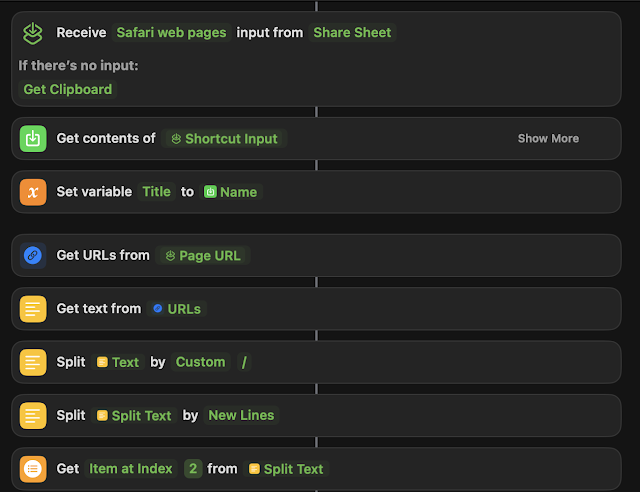
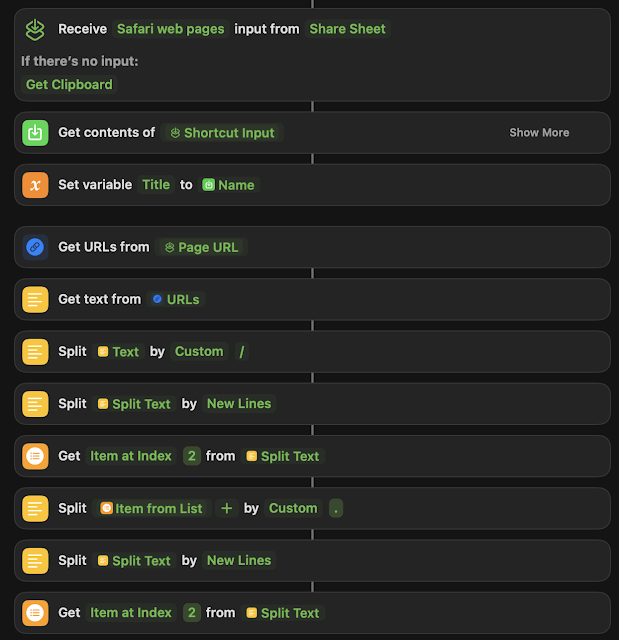
Assuming that there is more than two parts to the domain name, this works. But if you have and "A" type of url "blah.com" instead of a "CNAME" type like: "www.blah.com", you're going to get "com" as a result. So your milage may vary.
I couldn't find a good way to do this on the Internet, despite several attempts for people to try and figure it out using regex. You can then go on to store the result as a variable and then use the variable anywhere else in the rest of the Shortcut.
I wanted to integrate this functionality into a much larger shortcut, but this blog post will highlight just the domain parsing bit.
This will get you the whole domain name from any given URL from the share sheet. That being said, I wanted to take it a step further and get just the hostname out of the domain name:
Assuming that there is more than two parts to the domain name, this works. But if you have and "A" type of url "blah.com" instead of a "CNAME" type like: "www.blah.com", you're going to get "com" as a result. So your milage may vary.
Anyway, here's a way to do it. Hopefully this blog post helps someone trying to figure out the same issue. It's a little hacky, but knock yourself out.
Please leave comments below.
Please leave comments below.
Sort emails by year, using AppleScript
So, way back when I was using Thunderbird, I had this awesome plugin that organized my archived emails by year. It was super handy for finding stuff or just taking a trip down memory lane.
But when I switched to Mail.app, I couldn't find a similar plugin that I liked. Plus, even if one existed, I'd have to install it on every new Mac I got. So, I decided to take matters into my own hands and whip up some AppleScript magic.
In the code, you can pick a folder (sourceFolder) - in my case, it's "Recovered". You also need to specify your account name, like "iCloud" in my code. If your account goes by a different name, like "Exchange" or "Gmail", just tweak that part.
Then there's this variable called "yearsMailbox" at the top of the code, (in my case "Years") which is basically the folder where the emails will end up based on their years. You can rename it if you're feeling fancy.
You can probably make this more efficient by having it map the year folders one time instead of checking every time it wants to move a message, but I feel you're just playing "AppleScript golf" at that point. This works. It works great. Moving on.
tell application "Mail"
-- Specify the parent mailbox where the year folders are located
set yearsMailbox to mailbox "Years" of account "iCloud" -- Adjust if the path is different
-- List of sub-mailboxes under 'Years', each named with a four-digit year
set yearFolders to every mailbox of yearsMailbox
-- Specify the source folder where emails are currently located
set sourceFolder to mailbox "Recovered" -- Replace "SourceFolder" with the name of your folder
repeat with eachMessage in (get messages of sourceFolder)
set messageDate to date received of eachMessage
set messageYear to year of messageDate as string
-- Check if a folder for the year exists and move the message
repeat with eachYearFolder in yearFolders
if name of eachYearFolder is messageYear then
move eachMessage to eachYearFolder
exit repeat
end if
end repeat
end repeat
end tell
Please leave comments below.
Monday, November 13
Moving from Omnifocus to Reminders
Let's say you're like me, an avid Omnifocus user, but you've been hearing great things about Reminders on MacOS/iOS/iPadOS, and you want to give it a shot. Well, here's an AppleScript that will move everything over for you. It won't delete anything out of Omnifocus, so nothing will get messed up, but, it will take your existing projects and move them over as separate lists, then move the tasks over, preserving flagged, priorities, and the notes in each task (to Reminders.app's limitations).
TWO CAVEATS THOUGH
1. It can't move nested (subtasks) tasks from Omnifocus over, this is a very tricky problem to solve, and it's beyond my AppleScripting skills to access the subtasks and move them over properly.
2. I wanted to implement "tags" from Omnifocus over to the "tags" feature in Reminders, however Apple doesn't have "tags" as a Reminders dictionary item in AppleScript.
Other than that, this works fine:
property defaultList : "Inbox"
tell application "OmniFocus"
activate
tell front document of application "OmniFocus"
set theProjects to flattened projects -- Gets all projects, ignoring folders
repeat with aProject in theProjects
set projectName to name of aProject
set projectStatus to completed of aProject
-- Process only if the project is not completed
if not projectStatus then
set theTasks to tasks of aProject
-- Create a list in Reminders for each non-completed project
my createListInReminders(projectName)
repeat with aTask in theTasks
set taskStatus to completed of aTask
-- Process only if the task is not completed
if not taskStatus then
set theTaskName to name of aTask
set theNote to note of aTask
set theDueDate to due date of aTask
set isFlagged to flagged of aTask -- Check if the task is flagged
-- Determine priority based on flagged status
set thePriority to 0 -- default no priority
if isFlagged then
set thePriority to 1 -- high priority for flagged tasks
end if
-- Add tasks to the corresponding list in Reminders
my createReminder(projectName, theTaskName, theDueDate, theNote, thePriority)
end if
end repeat
end if
end repeat
end tell
end tell
on createListInReminders(listName)
tell application "Reminders"
if not (exists (list listName)) then
make new list with properties {name:listName}
end if
end tell
end createListInReminders
on createReminder(thelist, theTask, theDate, theNote, thePriority)
try
set theBody to theNote
tell application "Reminders"
if not (exists (list thelist)) then
my createListInReminders(thelist)
end if
tell list thelist of default account
if theDate is not missing value then
make new reminder with properties {name:theTask, remind me date:theDate, body:theBody, priority:thePriority}
else
make new reminder with properties {name:theTask, body:theBody, priority:thePriority}
end if
end tell
end tell
on error
-- Error handling can be implemented here if needed
end try
end createReminder
Please leave comments below.
Subscribe to:
Posts (Atom)
-
 Without going off the deep-end here and discussing every single Snort rule keyword, I just wanted to touch on a few modifiers that people so...
 -
Recently I needed the ability to grab a domain name (specifically the hostname) out of a URL using Shortcuts. I wanted to integrate this f...
-
 For those of you that haven't heard of DropBox, it's essentially a synced drive that is stored on DropBox's servers (in the clou...
